What the Expert Advisor Actually Does on Your Terminal
By the TradeAon team · Published · Updated · 8 min read
Dragging an EA onto a chart is the step where automation stops being a diagram and starts being a program running on your own computer, with your own account credentials, placing real orders. It is worth knowing what that program does between signals — how often it talks to the server, what it sends, which permission it needs, and how it avoids touching the positions you opened by hand. This page describes the MetaTrader side specifically, from the EA's own behaviour rather than from the marketing description.
- The EA runs on one chart in your terminal. Close the terminal and automation stops — there is no copy running elsewhere.
- It works on a timer, not on price ticks: a 150 ms loop for fetching orders, with everything else gated to roughly once a second.
- It polls the server rather than receiving pushes, which is why no inbound port or firewall change is ever needed.
- MetaTrader blocks outbound HTTP by default. The server URL must be added to the terminal's allowed-URL list or every request fails with the same error.
- Every position it opens carries a magic number derived from your account number, which is how automated positions and manual ones are kept strictly apart.
A program on a chart, not a service
An Expert Advisor is compiled MQL code that MetaTrader loads into a single chart window. That placement is not decoration: the chart is the EA's execution context, and the terminal only runs it while the terminal itself is open, logged in, and permitted to trade. There is no server-side copy of it. If the machine sleeps, the EA sleeps with it, which is the entire reason people run terminals on a VPS.
One instance handles the whole account, not one per symbol. The chart it sits on determines nothing about which instruments it may trade — a signal for gold executes perfectly well from an EA attached to a EURUSD chart, because orders are placed by symbol name rather than by the chart's own symbol.
Its behaviour is opt-in. Four independent modes — webhook execution, master (sending your trades out to be copied), slave (executing trades copied from a master) and trade journalling — are each off by default and switched on individually. An EA attached with none of them enabled connects, reports that it is alive, and does nothing else. That default matters when you are setting up: the first attach is safe, and you turn on capability deliberately.
The clock it runs on
Most trading EAs act on price ticks. This one is driven by a timer instead, because it is waiting for instructions from a server rather than for the market to move — and an instrument can go seconds without a tick in a quiet session, which would delay every order arriving during that gap.
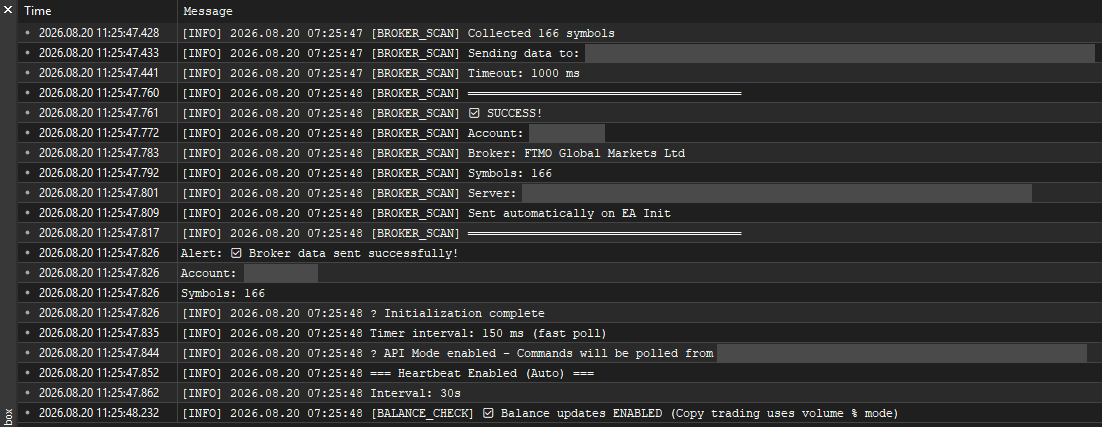
The timer runs at two speeds, chosen at startup by which modes are enabled:
| Situation | Timer interval | Why |
|---|---|---|
| Webhook or slave mode on | 150 ms | Order latency is the thing being minimised |
| Master or journal mode only | 1 second | Nothing to fetch — only outbound reporting |
| No modes enabled | 2 seconds | Status panel refresh alone |
The interval was tightened from 250 ms for a measured reason: it roughly halves the time a queued command waits before someone collects it, since on average a command sits for half a polling interval before it is picked up. It is not set lower than that, because a polling client also has to stay well inside the request limits the server applies per account — and past a certain point the extra requests buy a delay reduction too small to matter next to the broker's own fill time.
Everything that is not order collection is deliberately kept off that fast path. Inside the timer, a check compares the millisecond clock against the last housekeeping run and returns immediately if less than a second has passed. So heartbeats, balance reporting, trailing stops, breakeven moves and journal syncing all continue to run at their original once-a-second rhythm no matter how fast the poll loop spins. Speeding up order collection therefore does not multiply everything else along with it.
On top of that gate, individual jobs have their own periods — a heartbeat every 30 seconds, and a position-sync every 10 seconds when copy trading is enabled. Balance reporting is not on a fixed clock at all: it is sent when the balance moves by more than a small threshold, and otherwise on a slow keep-alive measured in minutes, because sending an unchanged number every few seconds is pure waste. Each HTTP call is given a short timeout, so a slow response delays one loop iteration rather than stalling the EA.
The conversation with the server
All communication is outbound. The EA asks; the server answers. Nothing connects to your machine, which is why automation works from a home connection behind a router with no port forwarding and no inbound firewall rule.
| Direction | What it is | Why it exists |
|---|---|---|
| Fetch | Command poll | Collect trade instructions waiting for this account |
| Report | Acknowledgement | Say what actually happened to each instruction |
| Report | Heartbeat | Prove the terminal is alive, and receive account status back |
| Report | Symbol registration | Tell the server what this broker calls each instrument |
| Report | Balance and equity | Keep the dashboard’s account figures current |
| Send | Trade publication | Master mode: announce a fill so followers can mirror it |
| Send | Position sync | State what is actually open, so divergence can be repaired |
| Send | Journal events | Opens, closes and deposits for the trading record |
Two of these are less obvious and worth explaining. The symbol list upload on startup is what makes cross-broker naming work at all: the server cannot know that your broker calls gold XAUUSDm until your terminal tells it, which is why symbol resolution only becomes accurate after the EA has registered once. It is skipped when the EA merely restarts because you changed a chart setting, since nothing about the broker changed.
The position sync is a periodic statement of what is actually open on this account. The server compares that against what a master account is holding and can close a copied position that should no longer exist. Without it, a follower that missed a close instruction would carry that position indefinitely, with nothing to notice the divergence.
The heartbeat is bidirectional in effect. It proves liveness to the dashboard, and the response carries status back — including whether the account is currently paused. That reply is the only thing that can wake a paused EA up again, which is why it keeps running even when nothing else is enabled.
The permission the terminal must grant
MetaTrader will not let an EA make arbitrary web requests. Every URL must be listed explicitly in the terminal's options, under the WebRequest allowed-URL list, and the check is against the exact host you entered.
When the permission is missing, the request does not merely fail — it never leaves the terminal. The EA logs the URL alongside an instruction to add it to the allowed list, which is why this particular failure looks identical every time and is easy to recognise in the Experts tab:
[HTTP] WebRequest failed: Error <code> - Add 'https://your-server/...' to allowed URLs
This is the single most common setup problem, and its symptom is misleading: the dashboard shows the account as offline, so the natural assumption is a network or credential fault. Nothing is wrong with either. The rule of thumb is that an account that has never once come online is usually a permission problem, while an account that was online and stopped is usually a connectivity or terminal problem. Two further details catch people out — the URL is protocol-specific, so an http:// entry does not authorise https://, and the list is per terminal installation, so a second terminal on the same machine needs its own entry.
Telling its own positions apart from yours
An automated account is rarely purely automated. People run a strategy while also trading manually on the same login, and a close-everything instruction that swept up hand-opened positions would be unforgivable. So every position the EA opens is stamped for identification.
The stamp has two parts. The magic number is an integer MetaTrader attaches to an order and never alters; the EA uses a value unique to each account rather than a fixed constant, so two accounts running the same EA do not share an identity. The order comment carries the origin, which is what separates a copied position from a webhook-driven one.
Together those give three ownership classes, and scoped operations respect them strictly:
| Class | How it is recognised | Who may touch it |
|---|---|---|
| Manual | Magic number is not the EA's | Nobody — never touched under any instruction |
| Webhook | EA's magic, comment without the copy prefix | Webhook close and netting logic |
| Copy | EA's magic, comment with the copy prefix | Copy close and reconciliation logic |
A CLOSE_ALL arriving from a webhook therefore closes webhook positions only. It leaves copied positions alone, and it leaves your manual trades completely untouched. This is the practical reason the distinction is worth understanding rather than merely trusting: the instruction does not mean what its name suggests, and that narrower meaning is the safe one.
There is one deliberate exception in how the check is applied. When the server sends a close for a specific ticket number — which it does for copied positions, because it tracks the mapping between a master's position and the follower's ticket — ownership is verified using the magic number alone, ignoring the comment. The reason is a MetaTrader behaviour: after a partial close, the remaining position can lose its comment entirely. Requiring the comment would make the EA refuse to close its own copied positions whenever that happened. The magic number cannot be cleared by the broker, so it is the reliable half of the pair, and it is enough to keep manual trades out of reach.
What an acknowledgement carries back
Collecting a command is not the end of the exchange. After acting, the EA reports the outcome, and that report is what the dashboard's event log is built from. If several commands arrived in the same poll, the acknowledgements are batched into one request rather than sent individually.
An acknowledgement carries more than success or failure. It includes the action taken, the broker symbol that was actually used after resolution, a reason and detail when something was adjusted or refused, the resulting ticket, the fill price, and the filled volume — which is not always the volume that was requested. A partial fill means the position is smaller than the instruction asked for, and recording the requested figure instead would leave the server's records overstating the position, so that a later close would be calculated against a size that was never actually open.
Failures are reported as failures. It is technically easier to acknowledge everything as successful and let the log stay clean, and the cost of that convenience is a dashboard that shows a trade the account does not hold. A rejected order that appears in the log as rejected is a problem you can act on; a rejected order recorded as filled is one you discover from your balance.
What it deliberately does not do
Knowing the boundaries is as useful as knowing the behaviour, particularly when deciding how much to rely on it.
- It does not decide anything. There is no strategy inside the EA. It executes instructions that arrive from your alerts or from a master account, and an instruction that never arrives produces no trade.
- It does not run without the terminal. No terminal, no automation — including during Windows updates and reboots, which is what a VPS is really protecting against.
- It does not accept inbound connections. Everything is outbound polling, so there is nothing exposed on your machine to secure.
- It does not fabricate results. A rejected order is reported rejected, with the broker's reason attached.
- It does not touch positions it did not open. Manual trades are outside every scoped instruction it can receive.
If you are setting up for the first time, the order that saves the most time is: attach the EA with all modes off and confirm the account appears online; add the URL to the allowed list if it does not; then enable one mode and send a single small test signal, and read the event log rather than the chart to confirm what happened. The log is where the EA reports the truth about its own actions, and it is the fastest way to distinguish a signal that never arrived from an order the broker refused.