Every Webhook Error TradeAon Returns, and What Each One Means
By the TradeAon team · Published · Updated · 7 min read
When a webhook is rejected, TradeAon answers with an HTTP status and a short error string. That string is not decorative — each one is emitted at exactly one place for exactly one reason. This page lists every rejection the signal path can produce, what triggers it, and how to reproduce it on purpose so you can tell a configuration problem from a payload problem without guessing.
- Rejections happen in four stages, and the stage tells you where to look: the URL and credential, then the JSON body, then which accounts the signal is allowed to touch, then delivery to the terminal.
- The HTTP status is the fastest triage signal: 401/403 means credentials or ownership, 400 means the payload, 404 means the URL or an account that is not registered.
- A 200 response means the instruction was accepted and queued, not that your broker filled it. Fills are confirmed separately in the dashboard event log.
- Every message below is reproducible on demand, which makes them useful as a self-test before you trust a new strategy with live capital.
The four stages a signal passes through
A webhook that arrives at TradeAon is not validated all at once. It passes through four checks in a fixed order, and it stops at the first one that fails. This matters when you are debugging, because the stage that rejected your request narrows the search enormously — there is no point rereading your JSON if the request never got past the credential check.
The order is: the URL and credential (is this a real license key, and if you configured a secret, was it supplied), then the payload (is the JSON parseable and does it contain a coherent instruction), then account resolution (do the accounts named in the payload belong to you, and are they permitted to trade right now), and finally delivery (can the instruction actually be handed to a terminal).
Because the checks run in that order, a single request never returns two errors. You fix one, resend, and may then discover the next. That is normal and is usually faster than it sounds — the whole cycle is a TradingView "Test" click and a glance at the response.
Stage 1 — the URL and the credential
These are returned before your JSON body is even parsed. If you see one of these, the problem is the webhook URL you pasted into TradingView, or the secret setting on your account — not the alert message.
| HTTP | Message | What actually triggered it |
|---|---|---|
| 401 | Invalid license key format |
The key segment of the URL is shorter than 10 characters. Usually a truncated copy-paste, or the URL was pasted without the key at all. |
| 404 | Invalid endpoint |
The key segment collides with a reserved path such as static, api, webhook or login. In practice this means the URL is malformed rather than that a key is wrong. |
| 401 | Unauthorized - Invalid license key |
The key is well formed but does not resolve to an account. It was regenerated, or the alert is still carrying a key from an older setup. |
| 400 | No JSON data received |
The request body was empty. Almost always the Message box in TradingView was left blank, or the alert was saved with notifications enabled but no message. |
| 401 | Unauthorized - Secret required |
You configured a secret on your account, and this request supplied none. Note the direction: the secret is optional until you set one, after which it becomes mandatory for every alert. It can travel either in the JSON body as secret or as an X-Webhook-Secret header — the response itself says so in its hint field. |
| 403 | Forbidden - Invalid secret |
A secret was supplied but does not match. Worth checking for a trailing space — it is easy to introduce when pasting into the TradingView message box. |
The distinction between the last two is the one people trip over most. Secret required means you sent nothing; Invalid secret means you sent the wrong thing. If you have several alerts and only some fail, compare them against each other rather than against the documentation — the working one is the better reference.
Stage 2 — the JSON payload
Once the credential is accepted, the body is parsed and the instruction is checked for coherence. Every message here is an HTTP 400. These are the ones you will meet while developing a new alert, and each names the field it is unhappy about.
| Message | What actually triggered it |
|---|---|
Invalid JSON payload |
The body is not parseable at all. The usual causes are smart quotes pasted from a document, a trailing comma after the last field, or an unquoted string value. On the license-key URL an empty body reports as No JSON data received instead — same cause, different stage. |
Missing field: account_number or accounts |
Neither a single account_number nor an accounts list was supplied, so there is no target to trade on. |
Missing field: action |
No action at all. This is the only field with no default. |
Invalid action. Must be one of: … |
The action is not one of the fifteen accepted values. The message lists all of them, so the response itself is the reference — see the action values guide for what each does. |
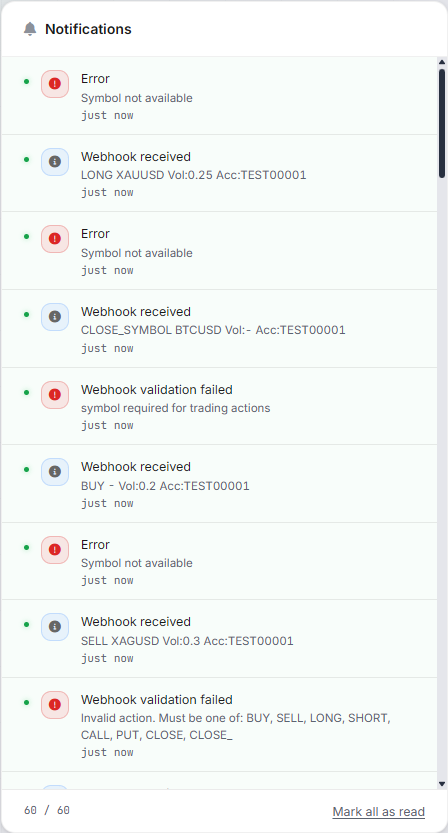
symbol required for trading actions |
An opening action (BUY, SELL, LONG, SHORT) with no symbol. |
volume required for trading actions |
An opening action with no volume. Note that a Pine placeholder that resolves to nothing produces this, not a zero. |
Volume must be a number / Volume must be positive |
Volume was present but not numeric, or was zero or negative. An unresolved {{strategy.order.contracts}} placeholder typically lands here. |
price required for limit orders / for stop orders |
order_type was limit or stop without an entry price. The message names whichever type you asked for. |
ticket or symbol required for CLOSE action |
A CLOSE with nothing to identify what to close. Supply a ticket for one specific position, or a symbol to match by instrument. |
symbol required for CLOSE_SYMBOL action |
CLOSE_SYMBOL is defined as "everything open on this instrument", so the instrument is not optional. |
ticket or symbol required for CANCEL action |
The same rule as CLOSE, applied to pending orders instead of open positions. |
ticket must be a number |
A ticket was supplied but is not an integer — often a placeholder that did not resolve, or a ticket wrapped in quotes by a template. |
close_percent must be a number / must be between 0 and 100 |
close_percent is a percentage, not a fraction. 50 means half; 0.5 is accepted as a number but means half of one percent, which will usually round below your broker's minimum step and close nothing. |
position_type must be BUY or SELL |
The side filter accepts only those two values. It narrows CLOSE_ALL to one side of the market, and does the same for CANCEL_ALL on pending orders. |
Stage 3 — account resolution
The payload is now coherent, so the question becomes which accounts it is allowed to act on. These errors are about ownership and current state rather than syntax, and they are the ones most likely to appear on a setup that used to work.
| HTTP | Message | What actually triggered it |
|---|---|---|
| 404 | Account not found. Please add this account via Dashboard first. |
The account number in the payload is not registered under your license. Registering happens in the dashboard, not by sending a signal. |
| 403 | Unauthorized account |
The account exists but is not yours. This is the check that stops one license from reaching another user's terminal, so it is deliberately strict. |
| 403 | No accounts found. Please add accounts via the dashboard first. |
The license resolves, but no accounts are registered at all. Expected on a brand-new account before the first one is added. |
| 403 | No allowed accounts. All N account(s) blocked. |
Every account the signal named exists and belongs to you, but none is currently permitted to receive it — the usual reason is that the account is over the plan's webhook-slot limit and has been paused. The count in the message tells you how many were skipped. |
That last one is worth reading carefully, because nothing is wrong with the alert. A paused account is a billing-state condition, not a payload condition, and resending the same signal will produce the same answer until the account is reactivated or a slot is freed. The plan limits page describes how many webhook-enabled accounts each tier allows.
Stage 4 — delivery, and why 200 is not a fill
If the signal survives all three stages it is queued for the terminals that should receive it, and you get a success response. This is the point where the most expensive misunderstanding happens, so it is worth being blunt about it: a 200 means the instruction was accepted and queued, not that a position exists.
The instruction still has to be collected by the EA in your terminal and then accepted by your broker, and either of those can fail after we have already answered. The terminal may be closed, algo trading may be switched off, the market may be shut, the lot size may be below the broker's minimum, or the broker may simply reject the order. None of that can be reported in the webhook response, because the response is sent before any of it has happened.
There is one delivery-stage rejection you can see directly. If the signal reaches the routing layer but no connected account can be given the instruction, you get Failed to send <action> to any account. In the copy-trading path there is also Symbol not available in target account, which means the instrument could not be resolved on the receiving side — that is a symbol-mapping problem rather than a connectivity one, and the symbol mapping guide covers how names are matched.
For everything after the 200, the dashboard event log is the authoritative record. It shows the signal as received, whether it was accepted, and what the terminal reported back, which is the only place the full round trip is visible.
Reproducing each error deliberately
Because every message above maps to a single condition, you can trigger them on purpose. That is more useful than it sounds: it lets you confirm your monitoring works before you need it, and it teaches you the shape of a failure while nothing is at stake.
The safest way to practise is against a demo account, changing one thing at a time from a payload you know already works. Delete the action field and you should get Missing field: action. Change the volume to 0 and you should get Volume must be positive. Set order_type to limit without a price and you should get price required for limit orders. Point the URL at a key with a character removed and you should get Invalid license key format rather than anything about your payload.
If a deliberate mistake produces a different error than the one you expected, that is genuinely informative — it usually means the request is failing earlier than you think, and the stage ordering in section 01 tells you where to look. A payload error you cannot reproduce, meanwhile, is often not a payload error at all but an intermittent connectivity problem being misread.
One habit worth forming: when you change a live alert, send it once with a deliberately invalid volume first. A rejection proves the URL, the credential and the account resolution are all still correct, which isolates the remaining risk to the trading parameters themselves. It costs one test click and rules out three of the four stages.